
Download TikTok Stories without Watermark
By using our service, you agree to the Terms of Service.
TikTok Stories disappear forever after 24 hours — unless you save them first. SSSTikTok is a free TikTok Story downloader that grabs Stories in HD, Full HD quality without any watermark, straight from your browser on mobile or PC. No app, no account, no limits.
Easy Guide to Download TikTok Story with SSSTikTok
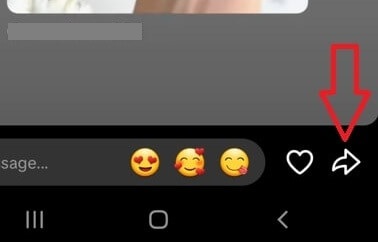
Step 1: Open TikTok → go to your profile (or the profile of a creator who is happy for you to save their Story) → tap the avatar circle with a blue border (that's the active Story), then tap the Share button (curved arrow) → select Copy link (chain icon).
 |
 |
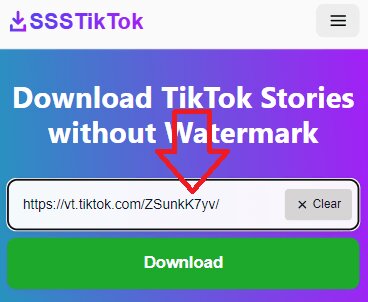
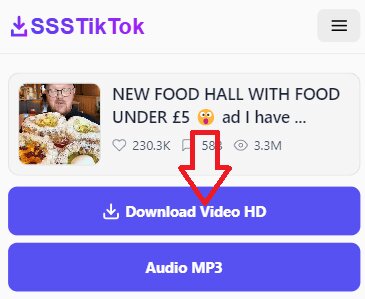
Step 2: Visit ssstiktok.me, paste the link into the large box in the middle of the page and press Download. The system automatically detects every item inside the Story and shows all available formats — MP4 video, photo, or MP3 — so you just pick what you need.
 |
 |
TikTok Stories are exploding with everyday moments, behind-the-scenes clips, product teasers, and "only up for 1 day" content. That 24-hour timer is exactly why a Story downloader matters: once it expires, there is no rewatching — the moment is gone unless you saved it.
Why Choose SSSTikTok to Download TikTok Stories?
- No watermark, no logo added to the saved video or photo.
- Original 1080p Full HD quality, preserving the original audio, text, stickers, and effects.
- Every format in one place: the tool auto-detects whether the Story is video or image and offers MP4, photo, and MP3 download options.
- Unlimited, no sign-up: no registration and no download history stored.
- Supports the latest TikTok versions, including Stories up to 60 seconds long.
What Can You Save from a TikTok Story?
| Format | What you get | Best for |
| MP4 video | The full Story clip in HD, no watermark | Keeping memories, moving your own Stories to Instagram/Facebook |
| Photo | Image Stories in original resolution | Wallpapers, screenshots-quality saves without the UI overlay |
| MP3 | Audio track only | Saving sounds and voice clips — see our TikTok MP3 downloader |
Common uses: creators archive their own Stories before they expire, and viewers keep a limited-time announcement for personal reference. Stories belong to the people who post them — don't repost someone else's Story without their permission.
Downloading a normal video instead of a Story? Just paste any TikTok link on our homepage — including HD quality up to 4K with the Download Video HD button. Photo posts work too, with our TikTok slideshow downloader.
Want to keep your own Stories after the 24 hours are up? Bookmark ssstiktok.me and archive them in just a few clicks.
FAQ – Answering Questions
Q: How do I know if an account has active Stories?
A: Avatars with blue/red/purple borders have Stories. If you don't see the border → you may have watched or it's been 24 hours.
Q: Can I download Stories from private accounts?
A: No, we respect user privacy.
Q: Is it okay to save someone else's Story?
A: Saving a public Story to watch later yourself is up to you, but the content still belongs to its creator. Ask for permission before reposting or sharing it anywhere else.
Q: Are text, stickers and music kept in the download?
A: Yes. The Story is saved as it appears, including effects, handwriting and its background sound. Music in Stories is often copyrighted, so keep it for personal use.
Q: Can I still download a Story after 24 hours?
A: No. Once TikTok removes the Story it is gone from their servers too, so no tool can recover it. Save Stories while they are still active.
Q: Can I save several Stories at once?
A: Paste one Story link at a time — each one is ready in a few seconds.
Q: Downloading on iPhone has an error and cannot open the ZIP file?
A: Just go to the Files app → long press the ZIP file → select “Unzip” → everything will appear immediately.
Q: Can I repost a downloaded Story to Instagram or Facebook?
A: Yes, if it is your own Story. If it belongs to someone else, get their permission first.